
Technology

The technology, explained.

Some equipment uses light, some uses electrical contact or pulsed fields, and some provides observations for discussion. Explore what each does, why we might choose it and how you take part in a session.

Understand the technology. Know what to expect.

Selected technology: Biofeedback / Scanning

Biofeedback / Scanning

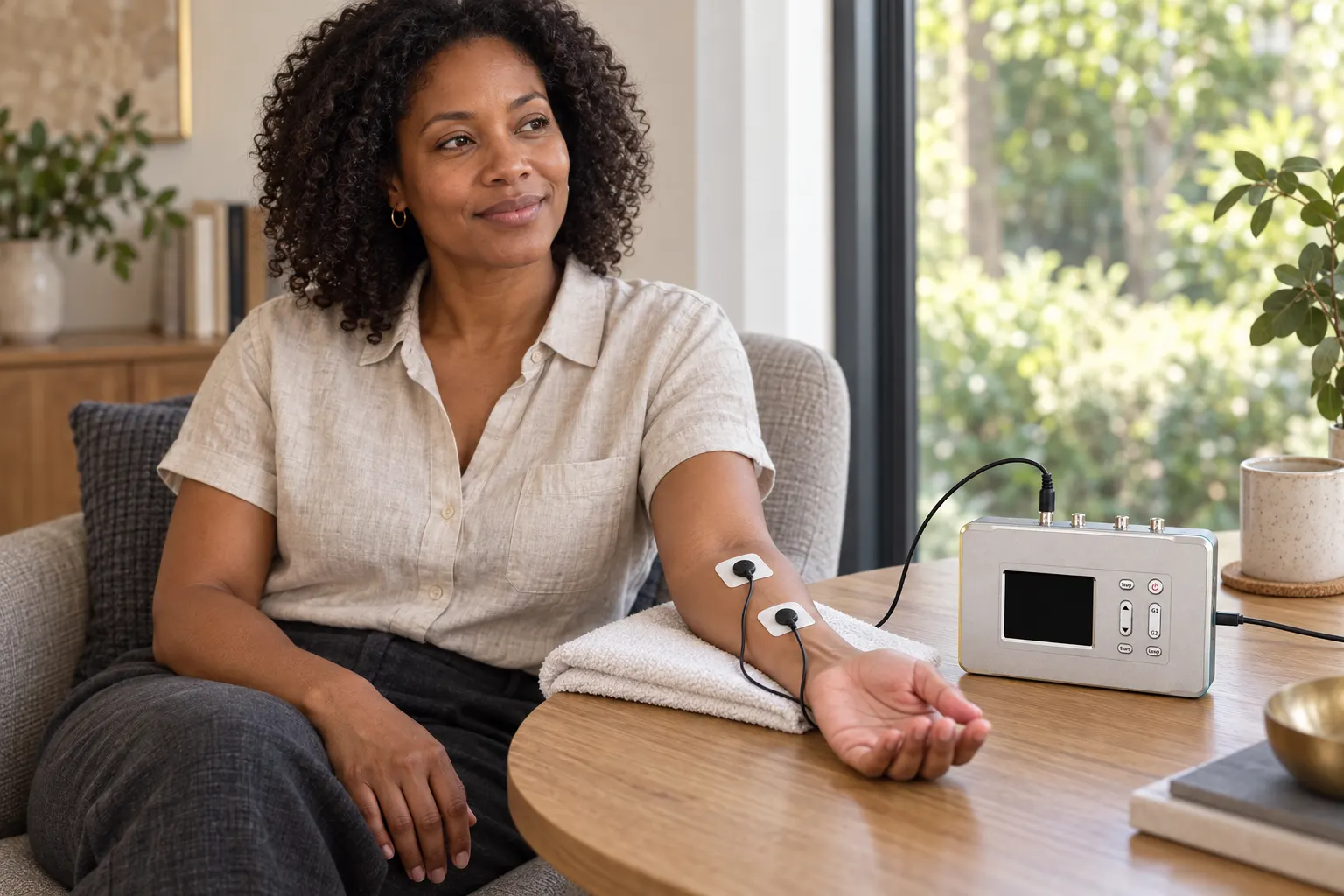
A seated woman with two contact pads on her supported forearm beside a frequency generator
Biofeedback · direct-contact recording

We use frequency-response recordings to help select a programme for your session.

Biofeedback involves measuring a response and using that information to guide the next step. At PHOENIX SANCTUM™, we use Spooky2 frequency-response scans. During a scan, we run a range of frequencies and record changes using the selected equipment.

  1. Record
  2. Review together
  3. Select and apply
  4. Review your experience

Understand the recording in your context

Your practitioner reviews the results with you. We discuss your health history, how you have been feeling and the patterns you have noticed in everyday life. This conversation helps us understand your wellbeing priorities and consider suitable support; the scan provides a record we can use when selecting frequency programmes.

Apply a programme selected for your session

We can save selected frequencies from your scan as a personalised programme and, where suitable, run it through the appropriate equipment during the same appointment. We explain the choices, check your comfort and agree how to review your experience.

Scan results do not diagnose conditions or establish what your body needs. Selecting frequencies from a scan does not establish that they will benefit your health.

Recording methods
Pulse
An ear or finger sensor monitors heartbeat timing while frequencies run through the selected delivery equipment. You remain still during the recording. Spooky Pulse scanning is not a clinical HRV assessment.
Direct contact
GeneratorX Pro records electrical responses through pads or suitable conductive accessories, such as hand cylinders. We can compare a chosen programme or a wider set of frequencies.
Scalar Digitiser
The digitiser records changes within the manufacturer's Scalar scanning setup. This is an equipment-specific comparison, not a direct reading of your wellbeing.
Sample Digitiser
An accepted, client-provided dry sample is used in the manufacturer's recording setup. The output is a technical comparison, not a medical laboratory result. Wait for our sample instructions before sending anything.
Suitability and evidence

Tell us about implanted electronic devices and any contact or skin sensitivities. Only send a sample after receiving our instructions; we accept approved dry material, not bodily fluids.

Ask about this technology
Read all ten technology formats

Biofeedback / Scanning

We use frequency-response recordings to help select a programme for your session.

Biofeedback involves measuring a response and using that information to guide the next step. At PHOENIX SANCTUM™, we use Spooky2 frequency-response scans. During a scan, we run a range of frequencies and record changes using the selected equipment.

  1. Record
  2. Review together
  3. Select and apply
  4. Review your experience

Understand the recording in your context

Your practitioner reviews the results with you. We discuss your health history, how you have been feeling and the patterns you have noticed in everyday life. This conversation helps us understand your wellbeing priorities and consider suitable support; the scan provides a record we can use when selecting frequency programmes.

Apply a programme selected for your session

We can save selected frequencies from your scan as a personalised programme and, where suitable, run it through the appropriate equipment during the same appointment. We explain the choices, check your comfort and agree how to review your experience.

Scan results do not diagnose conditions or establish what your body needs. Selecting frequencies from a scan does not establish that they will benefit your health.

Recording methods
Pulse
An ear or finger sensor monitors heartbeat timing while frequencies run through the selected delivery equipment. You remain still during the recording. Spooky Pulse scanning is not a clinical HRV assessment.
Direct contact
GeneratorX Pro records electrical responses through pads or suitable conductive accessories, such as hand cylinders. We can compare a chosen programme or a wider set of frequencies.
Scalar Digitiser
The digitiser records changes within the manufacturer's Scalar scanning setup. This is an equipment-specific comparison, not a direct reading of your wellbeing.
Sample Digitiser
An accepted, client-provided dry sample is used in the manufacturer's recording setup. The output is a technical comparison, not a medical laboratory result. Wait for our sample instructions before sending anything.
Suitability and evidence

Tell us about implanted electronic devices and any contact or skin sensitivities. Only send a sample after receiving our instructions; we accept approved dry material, not bodily fluids.

TENS / Contact Frequency

Electrical pulses through pads or conductive accessories.

TENS stands for transcutaneous electrical nerve stimulation: electrical stimulation through the skin. In our contact-frequency sessions, a generator sends the selected programme through pads, hand cylinders or another suitable conductive accessory. Placement and output determine the contact experience; you can tell us how it feels throughout.

When we consider it

  • Use pads for a defined contact area, with placement and comfort checked by the practitioner.
  • Choose hand cylinders or suitable wearables when you prefer an alternative to adhesive pads.

What to expect

You sit or lie in a comfortable position while we prepare the contacts, select the agreed programme and adjust within the device limits. Tell us about discomfort; we stop whenever you ask.

Equipment and options
Surface pads
Adhesive electrodes allow local placement. We check the skin and explain the expected sensation before starting.
Hand cylinders and wearables
Stainless-steel cylinders provide hand-held contact. Conductive wearables offer a hands-free option where suitable.
Portable contact device
A portable device offers another arrangement for a short, local application within a session.
Suitability and evidence

Tell us about a pacemaker or other implant, pregnancy, epilepsy, altered sensation, or irritated skin before booking. We check the exact device and placement rather than treating contact delivery as suitable for everyone.

Conventional TENS has a clinical research literature. That research does not establish the effects of a Spooky2 frequency programme or every contact accessory.

PEMF

Pulsed magnetic fields, with local or full-body coverage.

PEMF means pulsed electromagnetic field. An electrical signal drives a coil to produce a changing magnetic field. Unlike contact delivery, this does not require conductive pads on your skin. We use different equipment for a local application and for broader exposure while you rest on a mat.

When we consider it

  • Choose a local coil when the agreed session calls for positioning around a particular area.
  • Choose a full-body mat when you prefer a lying session with broader coverage and no adhesive electrodes.

What to expect

We confirm the equipment, position and programme, then help you settle for the agreed session time. You do not need to hold electrodes. The full-body mat and the local coil are different options, not different levels of guaranteed benefit.

Equipment and options
Spooky2 coil
A coil connected to the GX or XM generator provides a local field application using the selected programme.
MiraMate Magic Pro
A folding full-body mat and separate controller convert a selected audio signal into pulsed electromagnetic output. You lie on the mat during the session.
Portable PEMF
A smaller device offers local positioning for an agreed application within your session.
Suitability and evidence

Tell us about implanted electronic devices, pregnancy and any relevant medical restrictions. We check the manufacturer's instructions for the particular coil, mat or portable unit.

PEMF research uses varied devices and settings. Findings from another device or clinical protocol do not establish a health outcome for this session.

Scalar Field

A seated or lying session between two tuned units.

Spooky2 Scalar uses a transmitter and receiver arranged on either side of the session space. You rest between them without pads or handheld contacts. The system offers several modes: the paired setup on its own, a generator programme, or additional inputs. The proposed biological and information-transfer mechanisms remain unproven.

When we consider it

  • Explore a non-contact session without wearing pads, holding cylinders or keeping a local applicator in place.
  • Use an agreed generator programme within the paired-unit setup, or discuss the Pure and Harmony formats.

What to expect

We arrange and tune the units, explain the selected mode and help you sit or lie between them. You can rest without direct electrical contacts. Session length and any other technology application follow your agreed plan.

Equipment and options
Pure Scalar
The tuned transmitter and receiver operate without an added generator programme or substance input.
Rife Scalar
A connected frequency generator adds the selected programme to the paired-unit setup.
Scalar Harmony
The Harmony accessory adds an audio-frequency input to the setup. We explain the selected audio and arrangements before the session.
Molecular Scalar
The manufacturer's method places a selected substance on the input coil. This is an experimental information-transfer concept, not a way to receive a medicine or its established effects without taking it.
Suitability and evidence

The manufacturer says people who are pregnant or have a pacemaker should not use Spooky2 Scalar. Tell us about other implants or medical restrictions before arranging a session.

Scalar mode names describe equipment arrangements, not proven clinical effects. A Scalar Digitiser comparison is not a reading of your organs, emotions or nervous system.

Plasma

A gas-filled tube for non-contact frequency delivery.

Plasma is an electrically energised gas. In this setup, a frequency generator connects to Spooky2 Central, which drives a sealed plasma tube. The gas glows while the system runs. You sit or lie near the arranged tube rather than receiving the programme through skin electrodes.

When we consider it

  • Consider a non-contact application when you prefer not to use adhesive pads or handheld contacts.
  • Include a plasma application when the practitioner has selected that delivery method for your session plan.

What to expect

The practitioner prepares the generator, Central unit and tube before you settle into position. We maintain the required equipment clearances and check your comfort while the programme runs.

Equipment and options
Phanotron tube
A shaped plasma tube provides one arrangement for positioning the application near the session space.
Straight tube
An elongated tube provides a different physical arrangement. We choose and position the tube for the agreed setup.
Suitability and evidence

Tell us about implants, pregnancy or relevant medical restrictions. Plasma equipment requires electrical and electromagnetic safety checks, clearances and supervised handling.

The tube's glow shows that the gas is energised. It does not show a biological effect or establish that a programme destroys pathogens.

Frequency Foot Bath

Frequency contact through a prepared foot bath.

SANCTUM FOOTPATH uses water as the conductive medium for a feet-contact application. Instead of placing adhesive electrodes on your skin, the practitioner prepares the approved vessel, water and electrical arrangement for the selected programme.

When we consider it

  • Consider a seated feet-contact session as an alternative to pads or hand-held cylinders.
  • Include the foot-bath format within an agreed FFTS when the skin and equipment checks support its use.

What to expect

You sit with your feet in the prepared vessel. We explain the setup, check skin condition and comfort, and manage the session and cleaning. An FFTS provides the agreed application; book a consultation if you need a new assessment or plan.

Equipment and options
Prepared water contact
The practitioner follows the approved water, equipment and cleaning procedure. This is a controlled session arrangement, not instructions to put a conventional TENS unit in water.
Session-specific preparation
We confirm any ingredients, their suitability and the programme before the application. Tell us about skin sensitivities or allergies.
Suitability and evidence

We check skin integrity, sensation, infection-control requirements and electrical suitability before use. This is a practitioner-facilitated setup, not a home-use recipe.

The foot bath provides a contact medium. Changes in water colour do not demonstrate toxin removal or identify a health condition.

Cold Laser / Red Light

Low-power light directed at selected areas.

Cold laser uses low-power laser light rather than a cutting or heat-based laser. The Spooky2 Cold Laser Twin has two small red-light applicators operating around 650 nm. A connected generator controls the selected programme. Red-light equipment is a related light-delivery category; it is not interchangeable with every laser device.

When we consider it

  • Choose light delivery when you prefer a focused application without electrical contact pads.
  • Use the twin applicators for two selected locations, or discuss a wrist/point or broader red-light arrangement.

What to expect

We explain where the light will be applied, confirm positioning and eye protection, and set the session time. You remain in a comfortable position while the application runs. Tell us about unusual warmth or discomfort.

Equipment and options
Cold Laser Twin
Two small applicators allow paired or separate local positioning within the agreed session.
Wrist / point
An alternative accessory supports focused placement. The practitioner confirms the exact model, position and session time.
Red-light equipment
A separate light format can provide broader coverage. We match the equipment and positioning to the agreed application rather than treating all red light as the same dose.
Suitability and evidence

Laser light can injure eyes. We check the device class, eye protection and any photosensitivity, including relevant medicines, before use. Do not look into the light source.

Photobiomodulation is the research field concerned with biological responses to low-level light. Wavelength, dose, device and intended use matter; research on another system does not establish the effects of this session.

Ultrasonic

An applicator that converts electrical input into vibration.

Ultrasonic equipment produces mechanical vibration at frequencies above normal human hearing. The Spooky2 Central ultrasonic accessory provides this type of local application. It differs from a light applicator, magnetic coil or electrical contact pad, even when the practitioner includes it in the same broader plan.

When we consider it

  • Use a local mechanical-vibration format when the practitioner has selected it for the agreed application.
  • Discuss it as an alternative delivery method rather than assuming a light, contact or field device provides the same experience.

What to expect

We explain the local placement and prepare the accessory according to its instructions. Tell us about discomfort, unusual sound or any change in how the application feels so we can stop and check.

Equipment and options
Spooky2 Central ultrasonic accessory
The transducer converts the equipment's input into mechanical vibration. The practitioner manages positioning and device-specific handling.
Suitability and evidence

We check positioning, hearing-related precautions, pregnancy, implants and other relevant restrictions against the exact equipment instructions.

This is not an ultrasound imaging scan. The accessory's name does not establish equivalence to clinical therapeutic ultrasound or a particular penetration depth.

Structured Water / Imprinting

Prepared media for a take-home continuity routine.

Imprinting is the name used for applying a selected frequency programme during the preparation of water or another medium. PHOENIX SANCTUM documents the preparation and intended routine. The proposed retention or transfer of frequency information remains theoretical; it is not an established property or health benefit of the finished product.

When we consider it

  • Discuss a portable continuity format to accompany an agreed routine between appointments.
  • Choose a suitable medium and clear handling instructions before taking a product home.

What to expect

We confirm the medium, its purpose in your routine and the fee before supply. You receive the relevant directions, storage and use-by information. We review your experience at the agreed consultation rather than treating the product as a substitute for contact.

Equipment and options
Prepared water
The documented process includes distillation, carbon filtration, vortexing and selected programme application, with batch and drinking-water release checks.
Other continuity media
The current range includes selected liquids, oils, crystals or client-supplied media and stickers or slides. Availability, ingredients and instructions depend on the particular product.
Suitability and evidence

Follow the directions for the exact product. Ingested products require drinking-water or food-safety release checks; oils require ingredient and allergy review. Do not ingest a topical or display-only preparation.

Preparation does not establish enhanced hydration, detoxification, molecular restructuring or a therapeutic effect.

Remote Sample-Based Application

A practice-managed programme without travelling to sessions.

For sample-based Remote Services, the practice places an accepted, labelled dry sample in an assigned Spooky2 Remote holder connected to a generator. We run the agreed programme for a documented service period. The proposed non-local mechanism remains unproven; the service is distinct from a telephone or video consultation.

When we consider it

  • Discuss continuity between visits when travelling to the practice is difficult or you live elsewhere.
  • Choose an established, targeted or practitioner-managed programme with the contact and review level agreed in advance.

What to expect

We confirm suitability and location first, then provide sample instructions. The practice handles the equipment and records programme dates. Contact, adjustments and reviews depend on the service you choose; you do not need to attend for each programme run.

Equipment and options
Individual Remote Services
RDSP provides a preparatory sequence; RPS uses an established preset; RTS uses a selected fixed programme; RDS adds active practitioner management. Each has its own service scope.
REMOTE PRIME
The remote-only Pathway brings suitable services, TeleConsults and review points into a wider managed relationship. It is separate from the four individual Remote Services.
Suitability and evidence

Wait for confirmed instructions before sending a sample. Use accepted dry material only; do not send blood, saliva, urine, sharps or leaking material. Tell us about relevant medical and implanted-device considerations.

Remote Services do not monitor your health, detect emergencies or replace medical care. Read the Remote Services page for the individual formats and arrangements.

Start with a consultation if you need an assessment of your priorities and a new plan. Book a Facilitated Frequency Technology Session (FFTS) for an application we have already agreed. We confirm the equipment, appointment time and fee before you commit.

These explanations describe our complementary wellness services. We discuss suitability and evidence for the proposed application before you decide.

Your next step

Start with a new-client enquiry.

Tell us about your circumstances and whether you are considering in-person or individually confirmed remote support. We will respond when practical.

Read the collection notice in the form and our Privacy Policy before submitting sensitive information. Read the Privacy Policy.